

Table of content
- Introduction
- Commonly used theory
- Unity Implementation ML-Agents toolkit
- Conclusion
- Future work
- Last Words
- Bibliography
1. Introduction
For my R&D project I chose to make a project about Deep Reinforcement learning. The reason I chose to do my project on this subject is because I am super fascinated by what has been learned to all different kinds of AI’s and in which ways it can be used to make learning, testing and training easier. What is reinforcement learning you might ask? Well, Reinforcement learning makes it possible for a computer to learn. This is done through an agent interacting with the environment through trial and error. This computer will receive rewards by interacting with its environment. These rewards can either be negative or positive. This is how the agent gets feedback and trains to eventually learn what to do in its environment (Simonini, Sanseviero, & Paul, Deep RL Course: What is Reinforcement Learning?, 2018).

Figure 1 Begin state of agent in an environment (Simonini, Sanseviero, & Paul, Deep RL Course: What is Reinforcement Learning?, 2018).
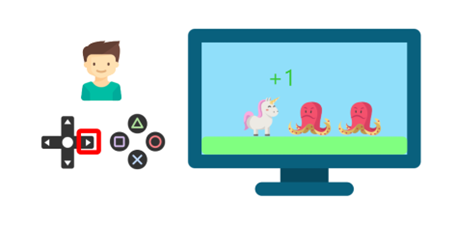
Figure 2 Agent grabs a coin which gives a positive reward (Simonini, Sanseviero, & Paul, Deep RL Course: What is Reinforcement Learning?, 2018).
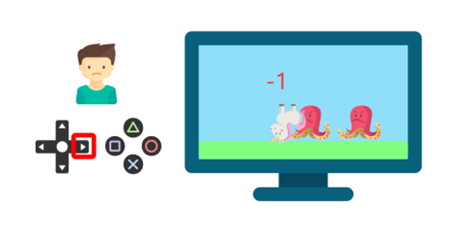
Figure 3 Agent touches an enemy and dies which gives a negative reward(Simonini, Sanseviero, & Paul, Deep RL Course: What is Reinforcement Learning?, 2018).
But where comes the “Deep” in Deep reinforcement learning into play? “Deep” means it uses a Deep Neural Network (DNN) to solve the reinforcement learning problems. (Simonini, Sanseviero, & Paul, Deep RL Course: The “Deep” in Deep Reinforcement Learning, 2018) Now you are probably wondering, what is a DNN? A DNN is a neural network with a certain level of complexity with at least more than two layers. “Deep learning” is oftentimes used to describe those neural networks. Deep learning is specific form of machine learning within this form of machine learning there are aspects used of artificial intelligence which order and classify data which is way more than a simple in/out – put protocol (Rouse, 2023). These complicated neural networks try to imitate the human brain hence trying to imitate its ability to learn(IBM, n.d.).
Before I dive deeper into the reinforcement learning rabbit hole I want to share the goal for this project. The Goal is to learn a lot about Deep reinforcement learning and make an AI which can be used to test out a randomized parkour. I will make several iteration of this to make sure it can traverse through different difficulty parkour.
2. Commonly used theory:
Agent: Is the entity that takes actions within the environment.
Action(A): An action is a move/operation which the agent takes. There are several actions the agent can take. The decision(action) the agent makes is which it choses from a certain set of “actions” it has available.
Discount factor: A discount factor helps adjust the importance of rewards that might happened in the future. This is done by making sure future rewards don’t have too much influence on our current decision making and how we estimate the value of actions. This is applicable for value as well as q-value.
Environment: This is the place which the agent moves through. The environment gets an input from the agent which is the current state and the action the agent takes. As output the environment will give a reward and the state the agent should be in next.
State(S): The current situation the agent finds itself in.
Reward(R): Type of feedback by which we measure if the actions were bad (a failure) or good (a success). There are two type of rewards: Immediate and delayed rewards. With immediate meaning right after an action of the agent and delayed meaning later because of an action. Rewards play a crucial role for an agent’s learning process.
Policy(π): The strategy that the agent uses to decide the next action based on the current state. It maps a state to an action, the action that promise the highest reward.
Value: This measures the optimality of a state by considering the expected long-term return when following a specific policy. It considers both short-term rewards and discounted future rewards, with the discounting reflecting that future rewards are worth less the further into the future they occur.
Q-value / Action-value: Q Value is similar to value, the only exception is that it takes an extra parameter: the current action. Q-values offer a more detailed assessment as they evaluate the goodness of a specific action taken in a specific state under a given policy. This added action parameter allows for a more precise evaluation of the expected reward when taking that action in that state.
Value function: A function of states that give an estimate on how good it is to be in state or how good it is to perform a certain action in each state.
(Nicholson, n.d.) (Baheti, 2021) (incompleteideas, n.d.)
2.1 Commonly mathematical and algorithmic frameworks:
Markov Decision Process (MDP)
The Markov Decision Process is a Reinforcement learning algorithm which gives a formal shape for decision making in a particular order. Within this framework the agent interacts with an environment overtime not just having emphasis on the immediate rewards but on the total reward obtained from actions taken in different states of the environment.
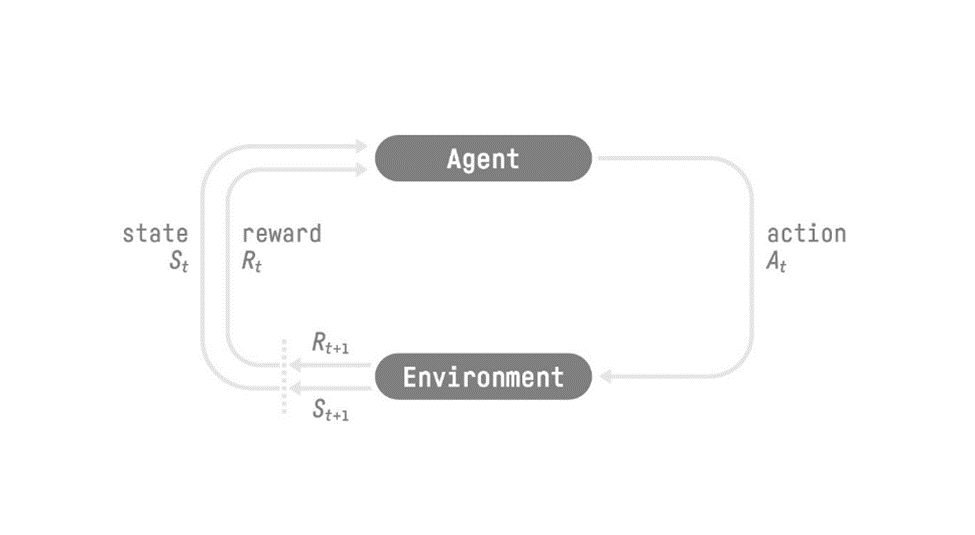
Figure 4 Reinforcement Learning process (Simonini, Sanseviero, & Paul, Deep RL Course: The Reinforcement Learning Framework, 2018).
Bellman Equations
Bellman is an algorithm that is used to give insight in what the value of the current state the agent is in is and if you take the best possible actions from its current state, what the long-term reward is that the agent can expect. This equation simplifies the calculation of the value function by breaking it down into smaller recursive equations.
Dynamic programming
Whenever you are dealing with a lot of possible states for the agent it becomes hard to solve the Bellman equation, hence the use of Dynamic programming to break down the equations into smaller/simpler parts. The two types of Dynamic programming that are used are:
Value iteration
With this algorithm using an iterative function to get the optimal state-value from all action. By choosing the optimal state-value the optimal policy is obtained.
Policy iteration
Two phases are used within this algorithm.
Policy Evaluation: Computes the values of states in environment which are given by the policy improvement phase.
Policy Improvement: Investigates state values given by policy evaluation and improves the policy to get higher state values (Higher expected rewards).
Q-Learning
By combining policy and value function it tells how good an action is when looking at future rewards within a table.
Deep Q-Learning:
Predict Q-value using Neural network for a given state.
(Baheti, 2021)
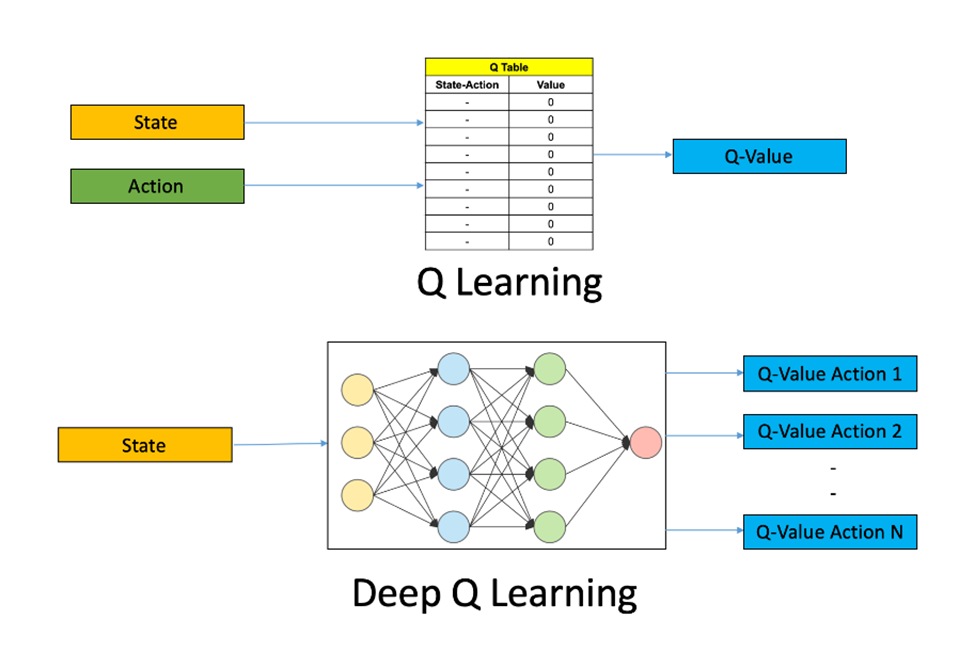
Figure 5 Visual representation of Q-learning and Deep Q-learning (Baheti, 2021).
3. Unity Implementation ML-Agents toolkit:
Shortly after starting my research on the subject, I came across a way to implement Deep Reinforcement Learning through a handy Unity Toolkit for this specific task called ML agents. This made it way easier to quickly implement an agent, environment, choose a policy and give rewards to the agent. I’ve installed it using the tutorial in the documentation which in short goes as followed. Install the recommended python installation from the web looking at the ML agents toolkit documentation. Make a virtual environment. Install all other recommended packages on this virtual environment. If any errors occur of dependencies not matching up, be sure to read carefully through the provided error message and install other version of packages or new packages accordingly. If everything works as it should you should be able to make a mlagent-learn –help command and get some documentation within your virtual environment CMD space. When all this is done be sure to download the latest unity package from the git of ml-agents(Juliani, et al., 2020) (Unity-Technologies, 2022) (CodeMonkey, 2020).
Utilizing NVIDIA CUDA CORES:
When watching the tutorial on how to implement ml-agents within unity CUDA was briefly mentioned. And I was interested in the use case so I decided to do a little bit of research and found out that it could help with Deep reinforcement learning. This is because of the possibility to utilize my GPU for training my Neural network. Cuda makes it possible to run code / algorithms on the GPU instead of only using your CPU. Machine learning is quiet a heavy task so that is why I was pretty interested in making this possible. It was easily implemented if you knew where to look. When I checked on the PYTORCH library website previous versions, it also mentioned that it is possible to install the library including CUDA compatibility So, this is what I did. (PyTorch, n.d.) (Wikipedia, n.d.) (CodeMonkey, 2020).
3.1 First Iteration of ML agents
Environment and agent behavior setup
For the first implementation of my Deep Reinforcement learning I took heavy inspiration on how to apply ML-agents within Unity from the YouTube tutorial from code monkey. I first want to understand all the different scripts or components that are available within the ML-agents toolkit before I fully focus on applying existing research. Applying research for optimization purposes and comparing different ways to make it work to see which method is best will come within later iterations. Let’s first make an agent that does a simple task perfectly before I move onto a harder task.
So, the first thing I want to do is making an agent that can start on a random location to the right and can find a target every time. To make this possible I had to create a environment where the agent could learn in. Within this environment I needed to have the following things: Agent itself, a Test field and a target to achieve. The Agent needed to be able to perform certain actions based on its environment. From the ML-agents toolkit a couple of things were needed to make this happen. There had to be a class which inherits from the Agent class.
Agent behavior is what I called the script which inherits from the Agent class. One of the things which came up in the inspector were Max Step (all the other fields you see are created by me).
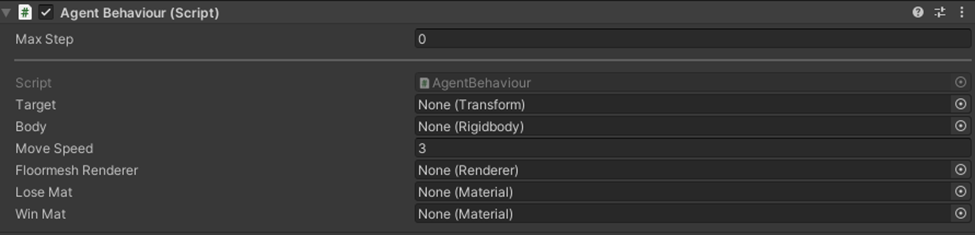
Figure 6 Agent Behavior Fields
And by having a script which inherits from Agent these behavior parameters were added automatically as well.

Figure 7 Behavior Parameters fields
There are a lot of things that are added but won’t be clear at first without a little research, that’s why I’ll explain what all the concepts that are added by this Agent inherited script.
Agent Behavior and Behavior Fields Explained
Max Step: As it says, the maximum number of steps which a single Agent may take before it will be reset.
Behavior name: The name to identify the behavior. All agents that have this behavior name will learn the same policy.
Vector Observation
Space Size: All the numbers that are observed in total.
Stacked Vectors: How many previous vector observations that will be stacked and used for decision making.
Actions
Continues Actions: Number of concurrent continues actions the agent can take. (Continues actions have a value from -1 to 1.
Discrete Branches: Number of Arrays (Branches) that will have the possibility to have a value from 0 to branch size amount (will only be int values). Each Branch defines a concurrent discrete action with a number of possibilities defined by the branch size number.
Model: The neural network that is used by inference. This neural network model is acquired after training.
Inference Device: What to use for inference, CPU or GPU.
Deterministic inference: With having a specific state and input you’ll always have the same output, no random possibility of having other outputs.
Behavior Type: Determine if an agent does: Training, Inference or heuristic methods.
Default: If python trainer has been connected this will initialize training otherwise will do inference.
Heuristic: Will use heuristic method.
Inference only: Will use inference method.
Team ID: Defines team for self-play.
Use child sensors: If it should use sensors attached to child game objects of the agent.
(Unity-Technologies, 2023)
First behavior parameter iteration.

Figure 8 Filled in Behavior parameter fields
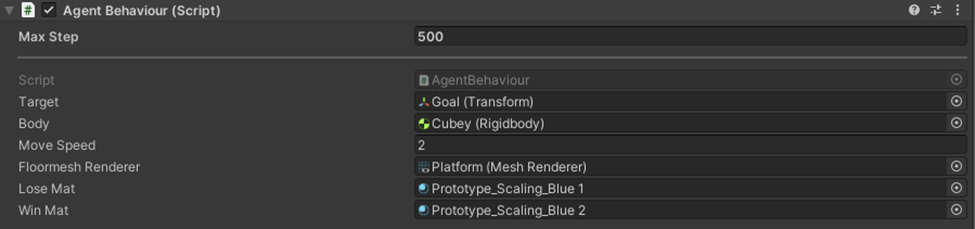
Figure 9 Agent Behavoir filled in fields
So, I gave the Space size a size of 10, because we have 2x vector 3 and 1x Quaternion which consist of 4 values. Within Actions I said I needed 2 branches. One branch for forward or not and the other branch is for rotation left, right or no rotation at all. The model is already in here because I’ve already trained the agent for this scenario. You can also see I gave the agent a max of 500 steps it can do before it resets and gave the floor renderer a specific color when it would do the right or the wrong thing within this environment.
First environment iteration:
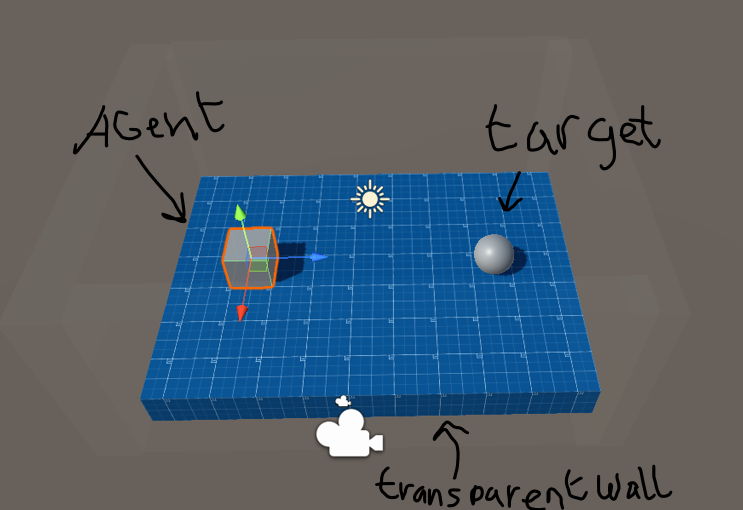
Relatively easy environment to start with, with an Agent, wall and target.
My agent behavior script:
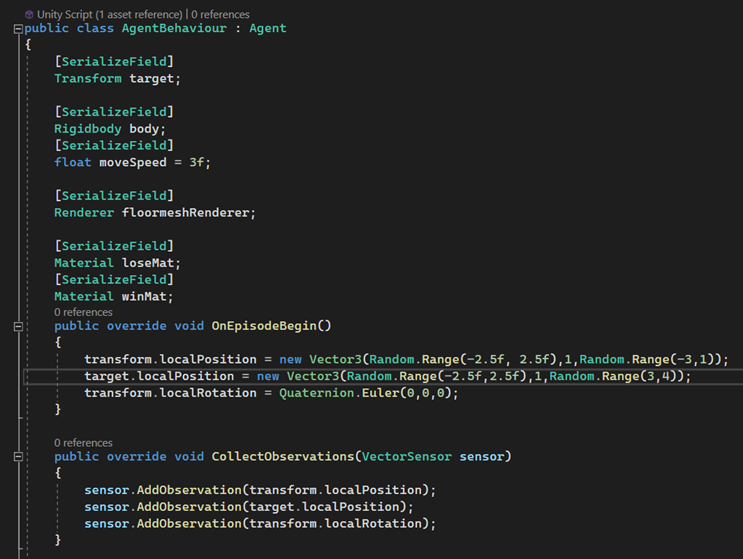
Figure 11 Agent Behavior script 1/2
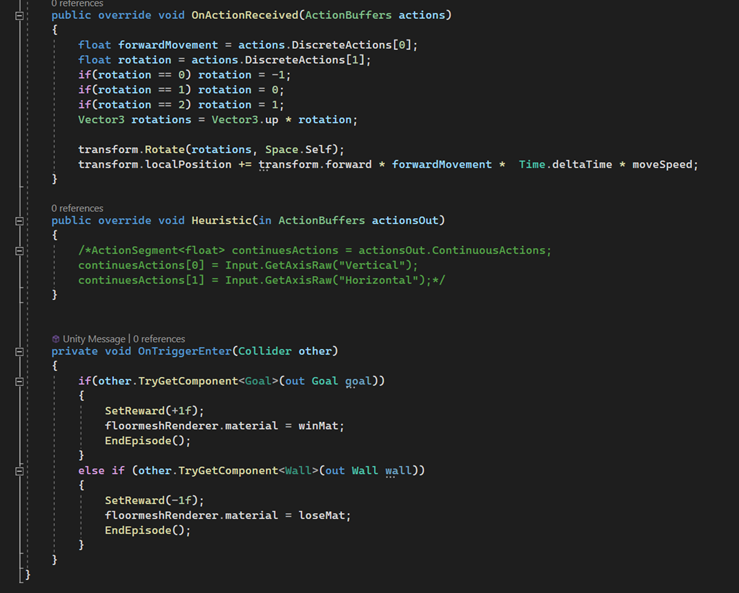
Figure 12 Agent Behavior Script 2/2
Seeing this script for the first time should raise some questions about how it works, so I will try to shortly explain what is happening within this script.
Every time an agent is reset by achieving a goal, walking into a wall, or achieving the Max Step I talked about earlier, a new episode begins (So this is an end of an episode). Every begin of an episode he will have a random position, will reset his rotation and the target will also have some random position. During the training he will try to figure out what to do. Looking at his information he has available to him he will try certain values to achieve a positive reward. This information he has available to him is the Observations I give in the collect observations method. Within the OnActionReceived method you’ll see that there are 2 array outputs which both give a certain value. This value can be between 0 and the branch size you gave the specific branch (using discrete actions) which are only int values. Those values can be anything you want them to be, however you want those values to do something which will give the agent some type of reward otherwise the agent will never learn what you want it to do.
In my OnTriggerEnter I have created a possibility for the agent to receive a positive or negative reward, based on which object it collides with. This is the way you learn your agent which is good, or which is bad to do (CodeMonkey, 2020) (Unity-Technologies, 2023).
Training
Pre-training setup:
To start a training, you’ll have to follow the following sequence of actions. Within your virtual environment in CMD you’ll have to make sure to call the command mlagents-learn command. With this command there are a lot of possibilities. I’ll cover the possibilities I need for training my agent for the first time.
Code line to put into CMD: mlagents-learn –force –run-id=<run-identifier>
The above line is the line which I used for training my first iteration.
Mlagents-learn: the pytorch library used to train the agent and create the Neural network.
–force: will override an earlier named identifier with the same name.
–run-id=<run-identifier>: give a name (identifier) to this specific training run.
(Unity-Technologies, 2018) (CodeMonkey, 2020)
Before typing in the command within your CMD you’ll have to make sure the behavior type has been set to “default”. As stated earlier, this is the setting you’ll use when training the agent. (CodeMonkey, 2020) (Unity-Technologies, 2018)

Figure 13 What the behavior type should look like
Make sure you’ll have a prefab which you can copy multiple times, this speeds up the training quiet significantly. (CodeMonkey, 2020)

Figure 14 Multiple prefabs to train faster
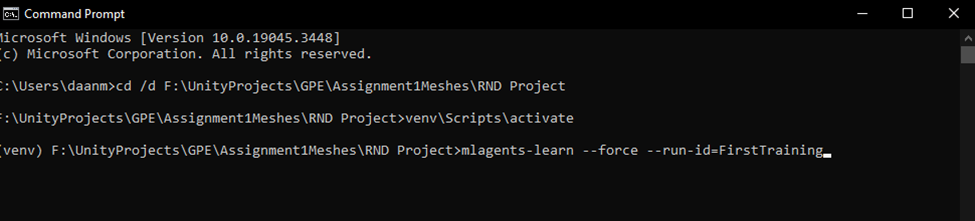
Figure 15 Commands to get ready for training
After typing in this command and everything is setup right, you’ll see the following message in cmd.
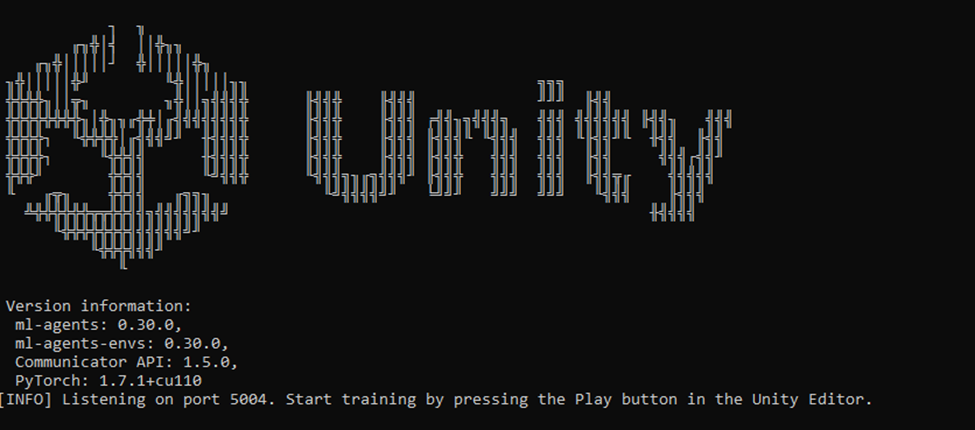
Figure 16 CMD when training command is entered
This is the moment you’ll start to run your environment (Unity-Technologies, 2018).
Training time:
While it is training you’ll see the following messages appear within your CMD. Here you see the following word pop-up which I’ll elaborate on.
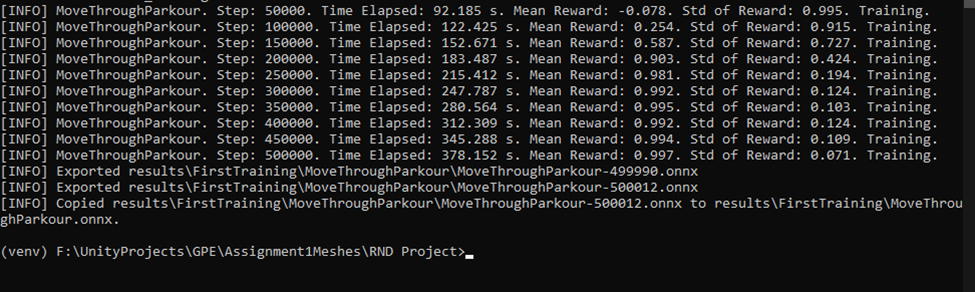
Figure 17 CMD during and after training
Step: Which step they are at right now (this is the total amount of steps of the agents that are training right now.
Time elapsed: how long it took to get to the steps which are specified in front of the message.
Mean reward: this should increase as training progresses, this is the average of the reward all the agents get each episode. (This value can differ depending on the max amount of reward an agent can get each episode).
Std of reward: the amount of variant from agent to agent in rewards received. (a low value is a good thing because every agent does have similar result). (Unity-Technologies, 2018) (Unity-Technologies, 2021) (CodeMonkey, 2020)
So, knowing the following definitions you can assume the training we did was successful, as the max amount of reward an agent could get was 1. So, the agents are trained to be close to perfect.
Training Graph:
After training or during training, it is possible to see a graph which displays how the agents are improving and how long each episode takes to finish. If your training is a success you should see a near perfect “Cumulative reward” (which is the same a mean reward) and a decreasing episode length because the agent gets faster in clearing their task (CodeMonkey, 2020) (Unity-Technologies, 2022).
Code line to get a link for this: tensorboard –logdir=results

Figure 18 CMD command to get to graph site
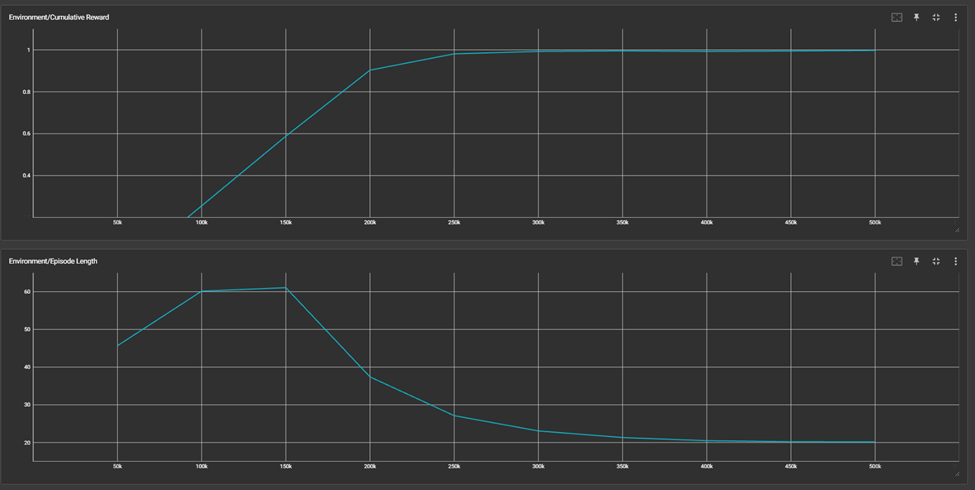
Figure 19 Graph of Cumulative reward and episode length
Result
3.2 Second iteration of ML-Agents
As seen in the previous result, I’ve achieved the result that I wanted to achieve and learned a lot about the basics of ML-agents Toolkit in unity. However, I figured that achieving a more impressive result would be doable. This is why I set a new goal for myself, which is: “learn the agent to jump over terrain when he deems it necessary”. To achieve this goal, I had to have an even better understanding of what I am doing with this toolkit. I had to find a better way of making my agent aware of what is going on around him. To find this I did more research on this toolkit within the documentation, articles and videos.
Agent Adjustments
Jump integration and agent step optimization
To make it possible for the agent to jump I had to add another possible action. To jump or not to jump. Achieving this was done by adding another discrete branch with a branch size of 2.

Figure 20 Additional Discrete branch visualized
Now the base has been set I can make the jump functionality within the agent’s behavior. With an on ground check and the necessary code in the agent behavior

Figure 21 onGround Check to check if jump is possible

Figure 22 Updated action method
As seen in the screenshots above I’ve made a simple check if the agent is on the ground before he can actually jump, so we don’t have a flying agent. Furthermore, I have added a negative reward every action the agent takes and a double negative reward whenever the agent jumps during an action. This is to prevent that the agent takes too long or jumps too much while trying to get to the goal (Unity Technologies, 2018) (CodeMonkey, 2020).
Making the agent aware of its surroundings
What I did up until now was giving information I deemed necessary as observation for the agent to consider. However, whenever I would add other maps which would differ in the amount of object and tasks the agent has to achieve I would have to add a big list of different objects positions and other information before the agent would have some understanding of his surroundings. This is why I search for something which would help to tackle this and make the agent more widely useable.
Within the documentation of this toolkit on GitHub I found that the observations that are needed are the things you would think the agent would need as information to clear the task you want it to complete. The task I want the agent to complete is to jump over the obstacle to get to the goal. So, what I need is to know is: when I am nearby an obstacle, if I need to go over this obstacle because it is a checkpoint and if I am near the goal (Unity-technologies, 2022).
Ray perception senor 3D
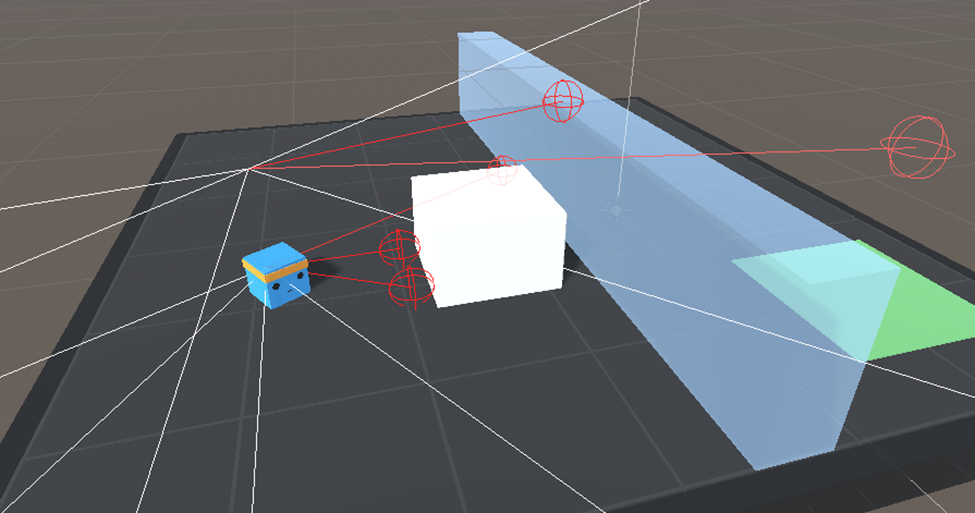
Figure 23 Example of raycast observation (Unity-technologies, 2022)
This is where I found the ray perception sensor. This is another way of providing observations for your agent by having different ray casts pointing in different directions to check if certain objects on specific layers and with certain tags are hit by those ray cast. This functionality is actually really easy to add. On your agent you can add a component from the ML-agents toolkit which is called “Ray perception sensor 3D” which is automatically added as observation, so I won’t need to reference them within the “CollectObservations” within the Agent Behavior class. The only thing that I do need to configure myself are the several settings that are available with this component. Those are the following:
Detectable Tags: Objects with this specific tag will be detected.
Rays Per Direction: Number of rays that are cast, one of the rays always faces forward.
Max Ray Degrees: Angle for the outermost rays.
Sphere Cast Radius: Size of sphere used for sphere casting (these spheres are at the end of the ray that is cast).
Ray Length: Length of the rays that will be cast.
Ray Layer Mask: Used to ignoring/using specific layers when casting.
Observations Stacks: Number of previous results to “stack” with the current cast result.
Start Vertical Offset: Vertical offset of ray start point.
End Vertical Offset: Vertical offset of ray endpoint.
Alternating Ray Order: Alternating order is default, changes order of ray from left to right to right to left.
(Unity-technologies, 2022)

Figure 24 Ray perception 3D Settings

Figure 25 Result of settings ray perception settings
This is how I implanted my Ray Perception sensor. This is what I came up with based on the examples that were given within documentation, videos I’ve watched and things I tried to see what gave me the best result. As you can see there are rays being cast in a lot of different direction. This is to make sure the agent knows in every direction around him if there is something there. I’ve taken all the different things that can be found into account within this iteration, probably later changes are needed but so far this gave the best results. (Unity Technologies, 2022) (CodeMonkey, AI Learns to Drive a Car!, 2020)
Last (best) result using these rays.


Figure 26 best results training with settings from above
Other result using other ray settings.

Figure 27 Another result worse result with other used settings
Decision requester
Up until now I did not talk about the decision counter because I actually totally looked over it and its functionality within my environment. This is because I did not change anything about it and I didn’t think the difference this can make would be something to write home about, but I was wrong because I didn’t look into it.

Figure 28 Decision requester settings
This is a component which is needed when u want an agent to make decisions at regular (academic) step intervals, which is done with a fixed time step (so non frame depended). Which in unity is 50 times per game time second. Which means every 1 frame fixed delta time will be 0.02 (default). So, if you would use the default amount to request (within the Decision Period setting), which is once every five academy steps, there will be a decision taken every 100ms. (ChillX, 2016) (Unity Technologies, 2022)
Different Decision Periods difference
Upon further trial and error, I concluded whilst testing that a higher decision period of 10 had a good influence on mean reward and standard deviation reward. This is great because according to the results a more optimized path is taken when having more time in between decisions. Below you’ll see the results of my testing.
Period of 5

Figure 29 Decision requester settings of period 5

Figure 30 Results which go with this decision period
Period of 10

Figure 31 Decision requester of period 10
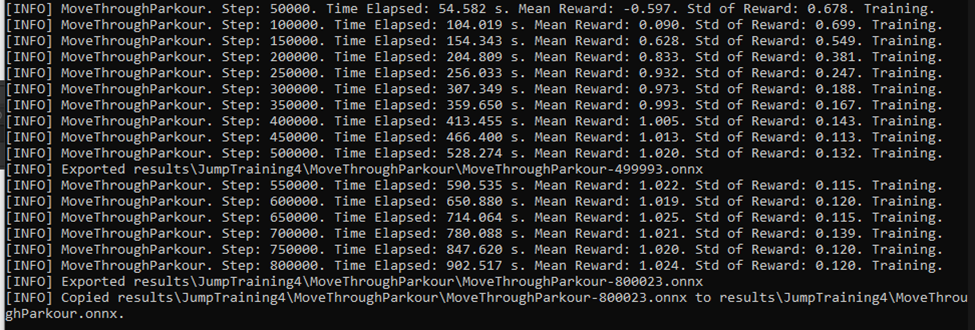
Figure 32 Results which go with this decision period
Training
Within the following screenshot the training time can be seen as well as the earlier talked about mean reward and standard deviation. As can be seen the mean rewards hits a little over 1. The total amount that is achievable is 1.5 (1+ for achieving the goal and 0.5+ for every checkpoint which in this level is only 1). This would be achieved when there wouldn’t be a negative reward based on actions (the higher the number of actions that are taken before the goals is achieved, the less points will be acquired). Later in the result you will see the goals is achieved every time as fast as the cube can go, with little to non, unnecessary movement. Still this unnecessary movement and the different distances from start point of the agent to the goal, can be seen in the standard deviation (how dispersed the reward is from the mean reward). This is now more clearly visible then before because of the negative reward that has been added for every step taken. Further CMD commands are not shown because those still are the same as default.

Figure 33 CMD output while training
In the table a pretty graph can be seen again of the “Cumulative Reward” (the mean reward) and the episode length (how long each individual episode takes on average). This is done again by the use of tensorboard with the command in CMD.
Training Graph
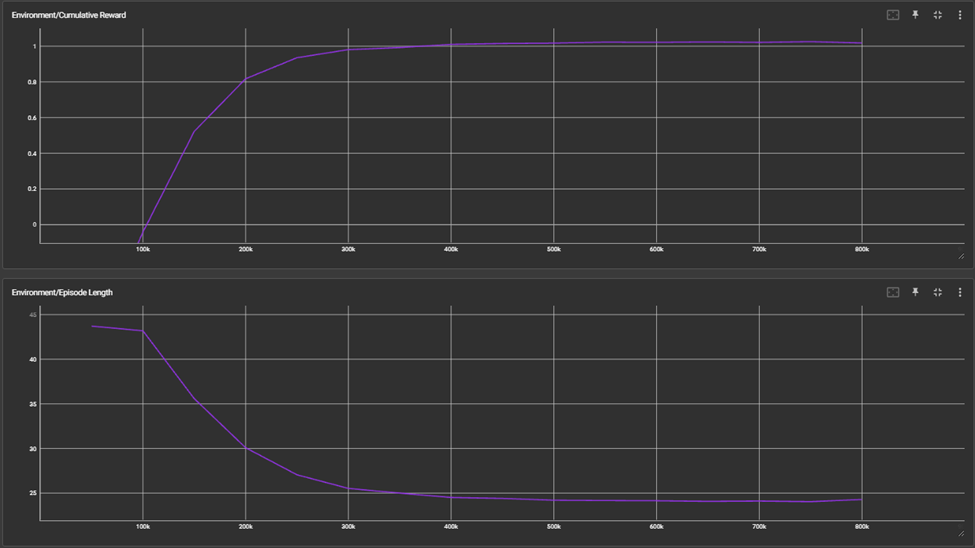
Figure 34 Training graph on cumulative reward and episode length
And here is a short video on how the training went.
Result
As can be seen within the result video, the agent can now get from the begin position to the goal with the use of a jump when necessary.
3.3 Third iteration of ml agents
Within the Third iteration of ML Agents, I wanted to change the environment to give a harder task to the agent, which I want to optimize through optimizing training configurations. First there will be some insights on how it got harder for the agent to clear the parkour and later there will be a deeper dive in different configurations like how they work, how those different configurations compare, and which configurations have been chosen based on this research.
The new Environment

Figure 35 Environment representation
So, as you can see the environment has some new elements in it. We have a heightened pressure plate which when fully pressed down opens the door within a translucent wall.
Furthermore, the positive and negative reward have been adjusted to work with a somewhat harder level like this one. The changes have been based on ml agent environment examples and further tips that were given by the unity technology staff. What I did was adjusting the negative per step based on another example. This Step Penalty will make sure that the agent will try to find a more optimized path to be less penalized in total for the steps he has taken. Also, positive rewards were added based on the specific checkpoints that have been reached by the agent to motivate the agent to get to those checkpoints again. Next to those additions the addition of an observation which is if the agent was on the ground or not was also added. And the last two things I’ve changed were the max steps per episode and the max steps that can be taken in total for the training. The reasoning for this is, because the agent couldn’t fully learn what needs to be done in the limited amount of total steps (academy steps).
(Unity Technologies, 2022) (Unity Technologies, 2020)
ML-agent Default configuration iteration
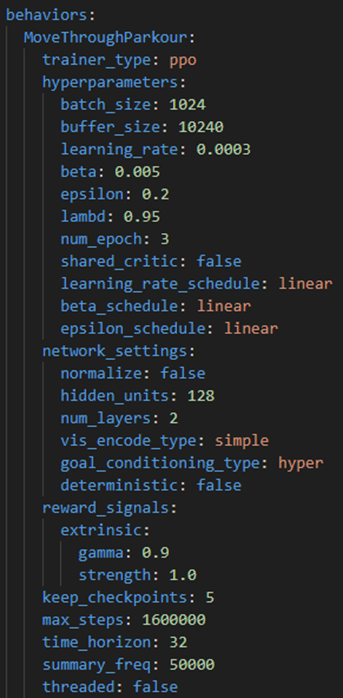
Baseline parameters
The following parameters are the baseline parameters that will be given as default when training. The only thing that is different from default is the max_step which is the number of steps in total can be taken for training. The reason for this adjustment is because within a harder environment the agent needs more steps to learn and always be able to clear the course.
Baseline Training
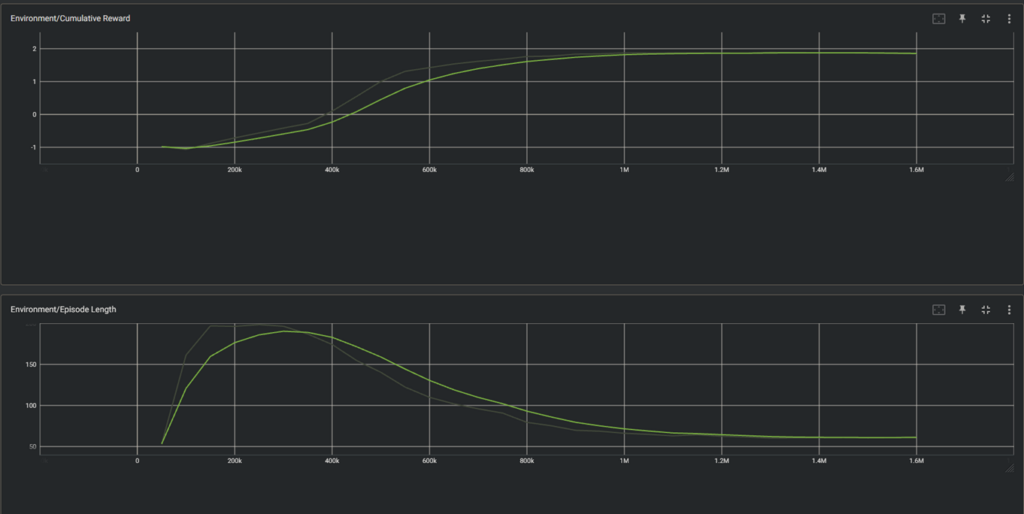
Figure 36 Training Graph improvement cumulative reward and episode length
Baseline Result
Reinforcement Training algorithms and their configurations
For ML-agents there were standard configurations that I was following. This was because at first i didn’t do any research about those configurations or the algorithms that were associated with them. I wanted to first have a better understanding of the ML-agents tool itself before I take a deeper dive into all the information that is available that can help me optimize my Reinforcement Learning.
PPO (Proximal Policy Optimization) Explained

Figure 37 PPO visualized (Hugging Face, 2022)
Proximal Policy Optimization (PPO) is a reinforcement learning algorithm which got introduced by OpenAI. Which should perform comparably or better than state of the art approach while being simpler to tune and implement. The way PPO does this is by updating the policy in a conservative way. This is done by checking how much the policy has changed compared to the previous policy. However, this algorithm wants to avoid that policies are changed dramatically, because this can be risky and lead to bad decisions. So, the algorithm uses clipping. This sets a limit to the ratio the policy is allowed to change. This will create a boundary on how much the Agents decision making strategy changes.
(Hugging Face, 2022) (OpenAI, 2017) (OpenAI, 2017)
PPO related configurations:
Hyperparameters
Beta: A parameter which makes sure the agent properly explores the action space while training. The higher this parameter the more random actions are taken. The amount of randomness should decrease slowly as reward increases. If the randomness drops too quickly beta should be increased. However, whenever the randomness drops too slowly the beta should be decreased.
Epsilon: With this parameter the max amount of divergence from the old to new policy will be set. So, this parameter will influence how quickly the policy can evolve. A higher epsilon has a quicker training process but less stability when updating. This works the other way around as well, the lower the epsilon the more stable the updates, however this will result in a slower training process.
Beta_schedule: This parameter determines the change of beta over time. Linear decays beta linearly, while constant keeps beta constant for the entire training run.
Epsilon_schedule: The parameter which determines the change of epsilon over time. Linear decays epsilon linearly, while constant keeps the epsilon constant for the entire training run.
Lambd: This parameter is used within Generalized Advantage Estimation (GAE) which is a technique to help the Agent learn to make a better decision. Lambda is a parameter which tells the Agent if it should trust its own guesses when lambda is lower or rely more on new information when lambda is high.
Num_epoch: A parameter which is the number of times it should review past experiences when performing a gradient descent optimization, which is an algorithm for finding a local minimum of a function. This is an algorithm to keep the total error of the model as low as possible.
(Unity-Technologies, 2022)
SAC (Soft actor critic) Explained
Soft actor critic (SAC) is another type of reinforcement algorithm that is designed to be efficient and stable and reduces the need for extensive hyperparameter tuning. It uses the “actor-critic” framework with the “actor” being responsible for selecting an action, while the “critic” evaluates the value of those actions and states. This framework tries to maximize the expected reward while maximizing entropy. Which mean try to get the best outcome while acting as random as possible. While acting as random as possible doesn’t seem rewarding at first it helps discovering new and maybe better strategies in the end. This algorithm differentiates itself from prior reinforcement learning methods by combining “off-policy updates” with a “stable stochastic actor critic formulation”. “Off policy” meaning it figures out the optimal policy regardless of the agent’s motivation. “Stable stochastic actor critic formulation” meaning it doesn’t result in chaotic behavior while a having an element of randomness in using the actor-critic framework. (Haarnoja, Zhou, Abbeel, & Levine, 2018)
SAC related configurations:
Buffer_init_Steps: The parameter that represents the number of experiences to collect into a so called “buffer” before the policy model will be updated. Filling this buffer with random actions is useful for the exploration of the environment.
Init_entcoef: With this parameter is said how much the agent should explore at the start of the training. The higher this value, the more early exploration, while making it lower will make sure the focus is set on finding a solution quickly during training.
Save_replay_buffer: This parameter will represent if the experience replay buffer as well as the model will be saved when quitting or re-starting the training. While this will help resumes (continuing from a model), this can take up a large amount of disk space as replay buffers can be quite large.
Tau: The parameter will correspond to how quickly the target network (which is for estimating future rewards) Will get updated. Increasing this value will increase training speed by decreasing the number of estimations of future rewards are done. While keeping this value lower will improve stability in the training process.
Steps_per_update: This parameter represents the Average ratio of agent steps (actions) to updates made in the agent’s policy. An update corresponds to the number of experiences that are taken for the experience replay buffer and using those experiences to update the models. Setting this lower will reduce the number of steps that are needed to train but increase the time spent performing updates by the CPU.
Reward_signal_num_update: The parameter that represents the steps per mini batch sampled (smaller portion of the dataset used for training) and used for updating reward signals. This is by default done once every time the policy is updated.
(Unity-Technologies, 2022)
Reward specific configurations:
There are two different types of reward signals. The extrinsic reward which is the environment-based reward signal and the intrinsic reward which can be seen as a type of supplement which could improve the learning process.
(Unity-Technologies, 2022)
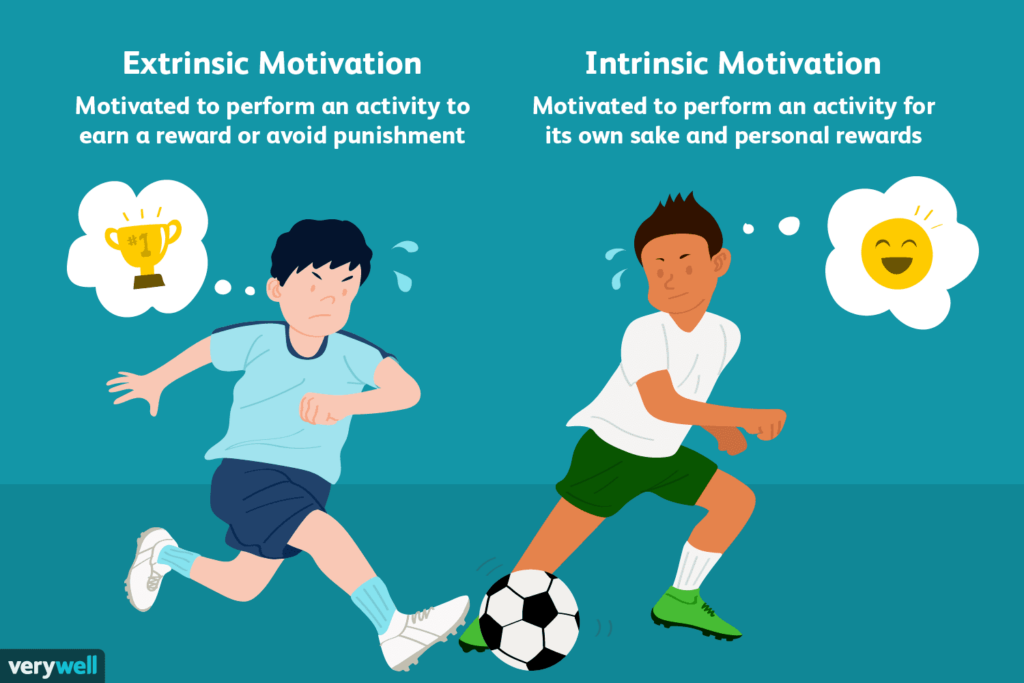
Figure 38 Extrinsic and Intrinsic explanation (Extrinsic vs. Intrinsic Motivation: What’s the Difference?, 2022)
Extrinsic rewards (environment-based reward signal):
Strength: A parameter to represent by which factor the reward should be multiplied given by the environment.
Gamma: The parameter which represents the discount factor for future rewards coming from the environment. Ranging from 0 to 1 the lower this parameter the more is focused on getting immediate reward. However, the higher you make this number the more it takes future rewards into account.
Curiosity intrinsic reward:
Strength: Within this parameter the magnitude of generated curiosity reward is given by a value from 0 to 1. This should be scaled accordingly to the extrinsic reward strength not to let one overwhelm the other and visa versa.
Gamma: This parameter represents the discount factor on the future curiosity rewards.
Network-settings: A parameter that represents the number of hidden units that should be in the intrinsic curiosity model.
Learning-rate: The parameter that represents the learning rate of the intrinsic curiosity model. This number should be decreased if the training is unstable, and the curiosity loss is unstable.
(Unity-Technologies, 2022)
GAIL intrinsic reward (learning from demonstration):
Strength: The parameter which represents the factor by which to multiply the reward. When using GAIL with an extrinsic reward you’ll have to make sure this value is set lower if the demonstrations are suboptimal and you don’t want the agent exactly copying the demonstrations.
Gamma: Within this parameter the discount factor for future rewards is set.
Demo_path: This is were to put the path to the .demo file or directory of those .demo files.
Network_settings: The number of hidden units for the GAIL discriminator.
Learning_rate: At which learning rate the discriminator should be updated. Should be decreased when the training is unstable, and the GAIL loss is unstable.
Use_actions: A parameter that is to determine if you would like the agent to copy the actions from the demo and should be false if you want to have the agent visit the same states as in the demo but have the possibility to choose a different action.
Use_vail: When enabled forces to learn a more general representation and reduces the tendency to be “perfect” at discriminating which makes learning more stable. This will however increase the time to train.
(Unity-Technologies, 2022)
Random Network Destillation (RND) intrinsic reward:
RND trains a prediction network to predict the output of a randomly initialized target network. This will improve exploration in reinforcement learning. (Rivlin, 2019)
Strength: Magnitude of generated curiosity reward by the intrinsic RND module. This should again be scaled that extrinsic is not overwhelmed and the other way around to make sure usage of the extrinsic and intrinsic reward signals are both applied on equal footing.
Gamma: A parameter which represents the discount factor for future rewards.
Learning_rate: The learning rate that is used to update the RND module. Should be small enough to have a stable learning process, but also large enough for the Module to quickly learn the state representation.
(Unity-Technologies, 2022)
Common Trainer Configurations:
This are general configurations that are not really based on a specific trainer type (Reinforcement training algorithms), or reward related.
Trainer_type: The type of Reinforcement learning algorithm to use.
Summary_freq: The quantity of experiences that need to be collected before training statistics are generated and displayed.
Time_horizon: The number of steps that need to be collected per-agent before it will be added to the “Experience buffer”. The time horizon should be large enough to capture important behavior within a sequence of an agent’s actions.
Max_steps: Total number of steps. These are all observations that are collected and actions that are taken accordingly. When training with the same behavior name in parallel this will contribute to the same Max_steps count.
Keep_checkpoints: The number of model checkpoints that you want to keep. A checkpoint is set when a checkpoints_interval number is met. When the max number of checkpoints is exceeded the first checkpoint will be deleted when saving a new checkpoint.
Even_checkpoints: When this is set to true checkpoints will be evenly distributed based on the keep checkpoints and max steps. This will be the formula: max_steps/ keep_checkpoints. If this parameter is set to true checkpoint interval will be disabled/ignored.
Checkpoints_interval: How many steps should be taken before making a checkpoint for the model.
Init_path: Which path to look at when you want to initialize a trainer from a previously saved model. To make this work same configurations should be used as the previously saved model.
Threaded: This parameter allows environments to step while the model is being updated. This could potentially speed up the training process.
HyperParameters
Learning_rate: In this parameter the initial learning rate for the gradient descent is being set. So, this corresponds to a gradients descents update step strength. In simple terms this means how quickly the model will adjust parameters during the training. A lower value will give a more stable training process. So, if there are any issues while training a lower value should be set.
Batch_size: The number of experiences in each iteration of the gradient descent. The value of this parameter should always be multiple times lower than the buffer size. Values for the batch size differ from one reinforcement learning to another. Another important thing that should be considered is if you will get a discrete or a continues value. This also influences that amount that this values should be.
Buffer_size: For PPO this is the number of experiences that should be collected before the policy model is updated. For SAC this is the max size the experience buffer should be.
Learning_rate_schedule: This parameter determines how over time the learning rate changes. For PPO a linear decay of this learning rate is recommended, While for SAC a constant learning rate should be kept.
Network_settings
Hidden units: This corresponds to the number of units in each fully connected layer of the neural network.
Num_layers: The number of hidden layers that should be in the neural network. For simple problems fewer hidden layers are recommenced for faster and more efficient training.
Normalize: If there should be normalization applied to vector observation inputs. This is recommended when using continues values but could be harmful if applied to discrete values.
Vis_encode_type: This parameter determines which method is used to process visual observations.
Conditioning_type: In this parameter a choice can be made on how goal observations are used in training process. With or without any special handling.
(Unity-Technologies, 2022)
Applying Algorithm related configuration research
Pre configuration comment
Before starting the configuration tweaking based on the different algorithms I want to point out that the goal here is to clear this environment with the agent to near perfection. A couple of things that have to be kept in mind. If there was no negative reward given during this training the max amount of positive reward that could be achieved is 2,2. However, because the agent needs those negative rewards per step taken to give it the push in the right direction and go as fast as possible plus it needs to get through several checkpoint which are not achievable within one action, the max achievable reward which is feasible is around 2.
PPO-specific configuration implementation
When trying to get to the first iteration of testing I’ve looked at what is best practice for this type of training and the behavior that has been set for this agent. By only changing those number there was already a significant improvement over the baseline result. Other tries were based on slightly tweaked parameters within those best practice values. With a slightly higher learning rate and a higher epsilon value, consistent near perfect runs were achieved.
(Unity Technologies, 2020) (Unity-Technologies, 2022) (Unity Technologies, 2023)
| Hyperparameter | #0 baseline | #1 | #2 | #3 | #4 | #5 | #6 |
| Batch size | 1024 | 512 | 512 | 512 | 256 | 256 | 512 |
| Buffer size | 10240 | 5120 | 5120 | 5120 | 2560 | 2560 | 5120 |
| Learning rate | 0.0003 | 0.0003 | 0.0003 | 0.0005 | 0.0005 | 0.0005 | 0.0005 |
| Beta | 0.005 | 0.01 | 0.01 | 0.01 | 0.01 | 0.01 | 0.01 |
| Epsilon | 0.2 | 0.2 | 0.2 | 0.3 | 0.3 | 0.3 | 0.3 |
| Lambd | 0.95 | 0.9 | 0.9 | 0.9 | 0.9 | 0.9 | 0.9 |
| Num_epoch | 3 | 3 | 3 | 3 | 6 | 3 | 6 |
| Shared_critic | false | false | false | false | false | false | false |
| Learning_rate_schedule | linear | constant | linear | constant | constant | constant | constant |
| Beta_schedule | Linear | linear | linear | linear | linear | linear | linear |
| Epsilon_schedule | linear | linear | linear | linear | linear | linear | linear |
| Mean reward | 1.839 | 1.939 | 1.923 | 1.963 | 1.960 | 1.891 | 1.941 |
| Std of reward | 0.457 | 0.301 | 0.316 | 0.214 | 0.249 | 0.402 | 0.280 |
| Time spent on training (min) | 20.36 | 22.5 | 23.13 | 23.16 | 29.55 | 22.66 | 31.05 |
| Episode length (in steps) | 64.07 | 45.17 | 49.84 | 44.67 | 44.62 | 47.46 | 45.62 |
As can be seen in the table above the result of #3 is the best of all the tries. With the highest mean reward of 1.963 and the lowest standard deviation of them all. The training time was among one of the fastest achieved. Having a mean reward of close to 2 has been a significant improvement in performance over the baseline configuration for PPO. This performance will be compared to the SAC algorithm performance to see which one can be optimized even further with common and reward configurations.
SAC-specific configuration implementation
The same steps were taken for the first iteration of sac training. First get the best practice configuration parameters and try to move from there. However, after 30 minutes the training was not even halfway. This type of training takes a lot more computing power and is a lot slower than PPO. The amount of time that was spent on training the first time was not worth it if PPO was already near perfect with only a fraction of the training time. Therefore, after one SAC related training the choice was made to drop SAC algorithm training and further optimize on other common and reward parameters to see if that will PPO even better.
(Unity Technologies, 2020) (Unity-Technologies, 2022) (Unity Technologies, 2023)
| Hyperparameter | #0 baseline | Hyperparameters Sac related | #1 |
| Batch size | 1024 | Batch size | 512 |
| Buffer size | 10240 | Buffer size | 100000 |
| Learning rate | 0.0003 | Learning rate | 0.0003 |
| Beta | 0.005 | Buffer_init_steps | 5000 |
| Epsilon | 0.2 | tau | 0.005 |
| Lambd | 0.95 | Steps per update | 20 |
| Num_epoch | 3 | Save replay buffer | False |
| Shared_critic | false | Init entcoef | 0.05 |
| Learning_rate_schedule | linear | Learning rate schedule | Constant |
| Beta_schedule | Linear | ||
| Epsilon_schedule | linear | ||
| Mean reward | 1.839 | Mean reward | -0.609 |
| Std of reward | 0.457 | Std of reward | 0.502 |
| Time spent on training (min) | 20.36 | Time spent on training (stopped manually) | 35.11 |
| Episode length (in steps) | 64.07 | Episode length (in steps) | 195 |
Common training and Neural network parameters
Within the table below only parameters will be shown which could have an impact on performance and are relevant for PPO and Discrete behavior values. Other statistic and save related parameters will not be discussed as those don’t affect performance.
(Unity-Technologies, 2022)
| Common parameters | #0 baseline best of PPO | #1 | #2 | #3 | #4 | #5 |
| Time horizon | 32 | 64 | 64 | 64 | 32 | 32 |
| Hidden units | 128 | 64 | 128 | 128 | 64 | 192 |
| Num layers | 2 | 1 | 1 | 2 | 1 | 2 |
| Mean reward | 1.963 | 1.931 | 1.910 | 1.897 | 1.875 | 1.929 |
| Std of reward | 0.214 | 0.291 | 0.205 | 0.424 | 0.372 | 0.329 |
| Time spent on training (min) | 23.16 | 22.13 | 21.4 | 20.91 | 20.7 | 21.73 |
| Episode length (in steps) | 44.67 | 47.81 | 55.92 | 47.71 | 54.8 | 47.27 |
Unfortunately, trying different kinds of common and neural network settings did not result in better result than the result that were achieved within the baseline best of PPO.
As for the other configurations regarding rewards, due to lack of time reward related configurations have not been further iterated, but will be addressed in future work.
Result
Begin state of ML-agents:
Baseline result without parameter tweaking:
Current state PPO with parameter tweaking:
4 Conclusion
Phew, here we are after quite some research. This is to give a short recap of what has been discussed up until now, how far I’ve come to achieving my goal and to give my opinion on the subject up until now.
Reinforcement learning makes it possible for a computer to learn to clear some specific tasks. This agent learns to clear those specific tasks by taking actions in its environment from its current state. It get feedback from doing things right by getting positive rewards and gets feedback on the things it does wrong by negative rewards. Based on those positive and negative rewards the policy will be adjusted to achieve the highest reward possible. There are a lot of different ways the policy can be adjusted to achieve the highest possible reward. Two algorithms that are used a lot for deep reinforcement learning in games have been discussed. PPO and SAC, with PPO having one of the best performances and is easily tuned. PPO has a conservative way of changing its policy by setting a max on how much the policy can change every update. SAC on the other hand is really computing intensive and tries to maximize the reward the agent gets while maximizing entropy. PPO was the algorithm that worked best for me as SAC wasn’t even able to train properly by taking insane amounts of time for training, which was sad in my opinion, because I would’ve loved to see the results. As for my goal.. In the end three different iterations of ML-agents were made which increased in environment difficulty with every iteration while still being random in spawn points. The third iterations PPO was picked as best option and further optimized with common and PPO specific configurations which helped it achieve near perfect results on the hardest environment that was build. So, I have come pretty far in understanding what Reinforcement learning is about and got pretty far in achieving what I wanted to achieve, however I am not there yet as it cannot be implemented in any project and learn some platforming level. However this was really fun to research and learn more about and achieve near perfect results with what I’ve made up until now. Within future work I hope to make this a product which can be easily implemented within a platform game and can help lots of people.
5 Future Work
The following things I would really love to look further into to make this into a full fledged product:
- Reward configurations optimization
- Easily applicable to a parkour related project to test out if the parkour is feasible or not or to play as a bot within a parkour game to “race” against. Making it a unity package.
- Automated training of the agent within a new environment and being able to run multiple simultaneously
- Easy configuration parameter tweaking based on the training algorithm that is been used.
6 Last Words
If you made it this far. Thank you so much for reading my blog. I hope u learned a lot with me :).
7 Bibliography
Baheti, P. (2021, Augustus 31). The Beginner’s Guide to Deep Reinforcement Learning [2023]. Retrieved from V7Labs: https://www.v7labs.com/blog/deep-reinforcement-learning-guide
ChillX. (2016, June 16). MlAgents DecisionRequester understanding. Retrieved from Forum.Unity: https://forum.unity.com/threads/mlagents-decisionrequester-understanding.1232352/
CodeMonkey. (2020, December 26). AI Learns to Drive a Car! Retrieved from Youtube: https://www.youtube.com/watch?v=2X5m_nDBvS4&t=1s&ab_channel=CodeMonkey
CodeMonkey. (2020, November 29). How to use Machine Learning AI in Unity! (ML-Agents). Retrieved from Youtube: https://www.youtube.com/watch?v=zPFU30tbyKs&list=PLzDRvYVwl53vehwiN_odYJkPBzcqFw110&ab_channel=CodeMonkey
Extrinsic vs. Intrinsic Motivation: What’s the Difference? (2022, May 23). Retrieved from verywellmind: https://www.verywellmind.com/differences-between-extrinsic-and-intrinsic-motivation-2795384
Haarnoja, T., Zhou, A., Abbeel, P., & Levine, S. (2018, Augustus 8). Soft Actor-Critic: Off-Policy Maximum Entropy Deep Reinforcement Learning with a Stochastic Actor. Retrieved from Arxiv: https://arxiv.org/pdf/1801.01290v2.pdf
Hugging Face. (2022, August 5). Proximal Policy Optimization (PPO). Retrieved from Hugging Face: https://huggingface.co/blog/deep-rl-ppo#the-intuition-behind-ppo
IBM. (n.d.). What is deep learning? Retrieved from IBM: https://www.ibm.com/topics/deep-learning
incompleteideas. (n.d.). 3.7 Value Functions. Retrieved from Incompleteideas: http://incompleteideas.net/book/ebook/node34.html
Juliani, Arthur, Berges, Vincent-Pierre, Teng, Ervin, . . . Danny. (2020). Unity: A general platform for intelligent agents. Retrieved from arXiv preprint arXiv:1809.02627: https://arxiv.org/pdf/1809.02627.pdf
Nicholson, C. v. (n.d.). A.I. Wiki: A Beginner’s Guide to Deep Reinforcement Learning. Retrieved from Pathmind: https://wiki.pathmind.com/deep-reinforcement-learning#:~:text=Deep%20reinforcement%20learning%20combines%20artificial,the%20rewards%20they%20lead%20to
OpenAI. (2017, August 28). Promixal Policy Optimization Algorithm. Retrieved from arxiv: https://arxiv.org/pdf/1707.06347.pdf
OpenAI. (2017, July 20). Proximal Policy Optimization. Retrieved from OpenAI: https://openai.com/research/openai-baselines-ppo
PyTorch. (n.d.). Get Started: Previous PyTorch Versions. Retrieved from PyTorch: https://pytorch.org/get-started/previous-versions/
Rivlin, O. (2019, January 24). Reinforcement Learning with Exploration by Random Network Distillation. Retrieved from towardsdatascience: https://towardsdatascience.com/reinforcement-learning-with-exploration-by-random-network-distillation-a3e412004402
Rouse, M. (2023, July 21). What does deep neural network mean? Retrieved from Techopedia: https://www.techopedia.com/definition/32902/deep-neural-network
Simonini, T., Sanseviero, O., & Paul, S. (2018). Deep RL Course: The “Deep” in Deep Reinforcement Learning. Retrieved from Huggingface: https://huggingface.co/learn/deep-rl-course/unit1/deep-rl
Simonini, T., Sanseviero, O., & Paul, S. (2018). Deep RL Course: The Reinforcement Learning Framework. Retrieved from Huggingface: https://huggingface.co/learn/deep-rl-course/unit1/rl-framework
Simonini, T., Sanseviero, O., & Paul, S. (2018). Deep RL Course: What is Reinforcement Learning? Retrieved from Hugging Face: https://huggingface.co/learn/deep-rl-course/unit1/what-is-rl
Unity Technologies. (2018). Learning Environment Design Agents: Rewards. Retrieved from Github: https://github.com/bascoul/Ml-Agents/blob/master/docs/Learning-Environment-Design-Agents.md#rewards
Unity Technologies. (2020, June 24). ML-Agents: Max steps. Retrieved from forum.unity: https://forum.unity.com/threads/max-steps.916730/
Unity Technologies. (2020, January 28). Training with Proximal Policy Optimization . Retrieved from Github: https://github.com/yosider/ml-agents-1/blob/master/docs/Training-PPO.md
Unity Technologies. (2020, January 28). Training with Soft-Actor Critic. Retrieved from Github: https://github.com/yosider/ml-agents-1/blob/master/docs/Training-SAC.md
Unity Technologies. (2022, November 21). Class DecisionRequester. Retrieved from docs.Unity3d: https://docs.unity3d.com/Packages/com.unity.ml-agents@2.3/api/Unity.MLAgents.DecisionRequester.html
Unity Technologies. (2022). Learning Environment Examples: Wall Jump. Retrieved from Github: https://github.com/Unity-Technologies/ml-agents/blob/release_20_docs/docs/Learning-Environment-Examples.md#wall-jump
Unity Technologies. (2022, December 2). Learning-Environment-Examples: Wall Jump. Retrieved from Github: https://github.com/Unity-Technologies/ml-agents/blob/develop/docs/Learning-Environment-Examples.md#wall-jump
Unity Technologies. (2023, October 15). Training ML Agents. Retrieved from Github: https://github.com/Unity-Technologies/ml-agents/blob/develop/docs/Training-ML-Agents.md
Unity-Technologies. (2018). Training-ML-Agents. Retrieved from Github: https://github.com/bascoul/Ml-Agents/blob/master/docs/Training-ML-Agents.md
Unity-Technologies. (2018). Training-ML-Agents: Training config file. Retrieved from Github: https://github.com/bascoul/Ml-Agents/blob/master/docs/Training-ML-Agents.md#training-config-file
Unity-Technologies. (2021). Getting-Started. Retrieved from Github: https://github.com/Unity-Technologies/ml-agents/blob/main/docs/Getting-Started.md#training-a-new-model-with-reinforcement-learning
Unity-technologies. (2022). Learning Environment Design Agents: Observation and Sensors. Retrieved from Github: https://github.com/Unity-Technologies/ml-agents/blob/release_20_docs/docs/Learning-Environment-Design-Agents.md#observations-and-sensors
Unity-Technologies. (2022, December 14). Training Configuration File: PPO-specific configurations. Retrieved from Github: https://github.com/Unity-Technologies/ml-agents/blob/develop/docs/Training-Configuration-File.md#ppo-specific-configurations
Unity-Technologies. (2022, December 14). Training Configuration File: SAC-specific Configurations. Retrieved from Github: https://github.com/Unity-Technologies/ml-agents/blob/develop/docs/Training-Configuration-File.md#sac-specific-configurations
Unity-Technologies. (2022, December 14). Training configurations File: Reward Signals. Retrieved from Github: https://github.com/Unity-Technologies/ml-agents/blob/develop/docs/Training-Configuration-File.md#reward-signals
Unity-Technologies. (2022, December 14). Training-Configuration-File: Common Trainer Configurations. Retrieved from Github: https://github.com/Unity-Technologies/ml-agents/blob/develop/docs/Training-Configuration-File.md#common-trainer-configurations
Unity-Technologies. (2022, November 21). Unity ML-Agents Toolkit. Retrieved from Github: https://github.com/Unity-Technologies/ml-agents
Unity-Technologies. (2023, July 25). Agent: Agent Properties. Retrieved from Github: https://github.com/Unity-Technologies/ml-agents/blob/develop/docs/Learning-Environment-Design-Agents.md
Unity-Technologies. (2023, July 25). Agents. Retrieved from Github: https://github.com/Unity-Technologies/ml-agents/blob/develop/docs/Learning-Environment-Design-Agents.md#observations-and-sensors
Wikipedia. (n.d.). CUDA. Retrieved from Wikipedia: https://nl.wikipedia.org/wiki/CUDA
