
Introduction
For my research project, I’ve chosen to work on Procedurally Generated Dungeons inspired by Dungeons & Dragons, a game I’ve not played much with my friends but would love to dwelve deeper into it. I personally have only experienced one shot sessions, which are faster and easier to get into. Dungeons are a core part of D&D, where we have exciting battles and adventures.
Dungeons in D&D come in all shapes and sizes. They can be natural caves, castles or anything in between. What makes each dungeon special are the way a dungeon is played out. This depends heavily on how a dungeon master plays everything out.
In this project, my main focus is on generating dungeons for two specific enemies, vampires and kobolds. These two will have a different type of dungeon because vampires have more like a castle base compared to the kobold’s caves/dungeons. I want dungeon masters to have an easier time creating these types of dungeons for their sessions.
My goal is to make a dungeon generator that is easy to use for dungeon masters that want to create specific enemy map layouts.
Requirements
For my D&D based dungeon generator I want to focus on dungeons based on two specific enemies, vampires and kobolds. The dungeons are based on their territory. The randomization for the rooms matter less because it’s based on the territory of the enemy. Kobolds love to have dragons so for example a dragon could be an endboss in their cave. There will be multiple pathways to reach the end of the cave. Some may be dangerous and others may be safe. This is something a dungeon master can play around with.
The first image is a draft of how an enemy dungeon should look like. Here are examples of a kobold lair and a vampire lair. This is the result I want in my dungeon generator. The graphics may not be the same but i want it to be random generated and customizable for a dungeon master, so he can adjust anything to his own likings.

Figure 1 example of a draft of how a dungeon should look like, with enemies, traps and a boss

[7] Figure 2 example of a kobold’s lair

[8] Figure 3 example of a vampire’s castle
[1] Level generation
I want to use room generation for my D&D dungeon generator project. It’ll make the dungeons more interesting and fun to explore. With room generation, I can create different types of rooms and layouts, making each playthrough unique. It’ll save time on manually designing dungeons and add an element of surprise for both players and the dungeon master. This project is a great opportunity for me to learn more about procedural generation and how it can enhance the D&D experience.
[1.1] Random room placement
The first thing I looked into is random room placement, with each room being of different sizes. This can be done in two ways. The first way is by randomly placing rooms inside of an area and each time an area overlaps another area you make it invalid and try again. You keep doing this until you have a set number of rooms or it failed enough times. The rooms

[6] Figure 4 random room placement algorithm example
The second option for random room placement is by creating a pile of rooms on top of eachother and pushing all the rooms away from eachother. You do this until each room is not colliding with other rooms anymore. After each room is pushed apart from eachother you randomly choose a room to use for a dungeon.
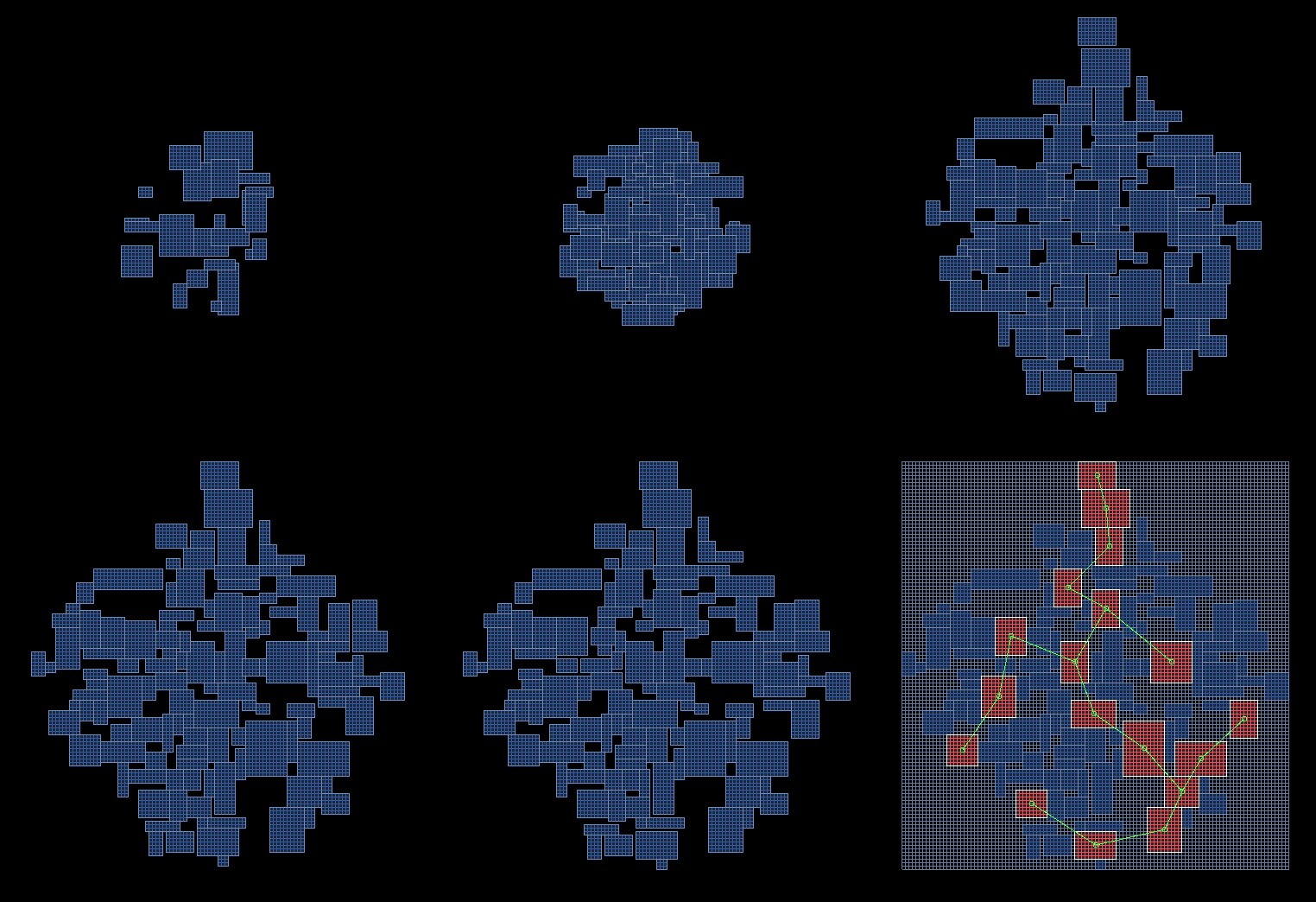
[9] Figure 5 Random room placement
The last option is to create a room dependent on their max size. We will then calculate the width and the height making sure we dont go over the max size of the room. To make sure the rooms don’t collide we have a distance check for the rooms, if the width or height is larger than the distance check then we create the room again.
[1.2] Cellular automata
Cellular automata is like a digital grid where cells change states based on their neighbors. Imagine a checkerboard, and each cell follows specific rules to decide if it should be on or off in the next step. Where each cell’s state depends on its surroundings. My rules imply if it has 4 neighbours it should turn on and if it has less than 4 neighbours then it should turn off.

[10] Figure 6 Cellular automata example
[1.3] BSP tree
This algorithm uses the BSP tree data structure to ensure non-overlapping room placement during dungeon generation:
- Begin with an rectangular dungeon space.
- Select a random direction (either horizontal or vertical) and a random position (x for vertical or y for horizontal) to create a split in the dungeon.
- Divide the dungeon into two separate sub-dungeons based on the parameters determined in step 2.
- Reiterate the process by choosing a random sub-rectangle within each of the split sub-dungeons and repeating step 2 for a specified number of iterations (n).
- After completing n iterations, allocate random-sized rooms within each of the sub-rectangles.
- Establish connectivity between the rooms by systematically traversing through all the split sub-regions and forming connections to ensure accessibility and coherence within the generated dungeon.

[11] Figure 7 BSP tree
[1.4] Drunken walk algorithm
I started off with researching the drunken walk algorithm to generate the dungeon. I’m using this algorithm to create interesting and unpredictable dungeon layouts. It works by simulating someone stumbling around randomly, and this randomness helps in making the dungeons diverse. Each room will be unique in it’s own way, so there are no preset rooms. This makes the D&D experience different everytime you go through a dungeon.

Figure 8 In the picture above you can see the room it has generated. This is random each time.
[1.4] Conclusion
After going through the different solutions for generating a dungeon, I’ve choses to go for the drunken walk algorithm, random room placement and cellular automata. The reason i didnt go for BSP tree is because it felt too limiting on how to expand the map. The drunken walk algorithm allows for the most customization allowing me to create kobold caves and vampire dungeons. Cellular automata allows me to create one big kobold cave system. The random room placement allows me to make different sized vampire rooms.
The drunken walk algorithm is however not perfect. Only running the drunken walk algorithm would make dungeons too random and unusable for D&D. That’s why in the next chapter I will be talking about the different problems and solutions.
[2] The Problem with drunken walk
The first problem is that some rooms might not look like an actual room, they look very messy and unorganised. A solution to this problem is to fill up the empty spaces that have a set number of neighbours. Playing around with the amount of neighbours needed allows the dungeons to have different shapes. Lowering the number of neighbours makes the dungeon look more like a room that could be used in a mansion. With high numbers the room will look more like a cave for low tier monsters/enemies.

Figure 9 before filling the gaps

Figure 10 after filling the gaps

Figure 11 The code for filling in these gaps
To fill the empty spaces I made a check of the room that picks out the furthest top left corner and bottom right corner. By doing this he will make a grid of the entire area. If the area is filled with the room it wont do anything with the room itself obviously, but for the empty spaces he will check if that empty space has two neighbours or more. If it does have two or more neighbours it will fill that empty space. This way the room wont have weird empty spots and will make it look more like a room.


Figure 12 This is the code that does these checks.
[3] Generating the dungeon
[3.1] The goal of the generation
In D&D, enemies and dungeons are a big deal. They’re like the core of the whole adventure. Enemies, whether they’re big monsters or sneaky little creatures, make the players’ experience interesting. They give players a challenge to face. And dungeons, they’re like the setting for the whole story, filled with stuff like treasures and traps. So, for my dungeon generator project, I want to focus on making it easier for dungeon masters to create a dungeon layout for their sessions.
[3.2] Generating different types of dungeons
To create different type of dungeons I’ll need to manipulate how the drunken walk algorithm chooses the next room location. As an example when creating a vampire dungeon you need to create a set of rooms that can be randomized that have a higher chance to be connected to eachother to create a sort of maze-like structure. In contrast when creating a kobold dungeon you’d want to create a dungeon that is more like a cave system. To achieve this i can manipulate in which direction the drunken walk will go to. Another edition to help with creating different types of rooms is a room manager which holds a number of rooms that need to be generated. Each room will hold information like how big the room should be and if it will contain enemies or not.
Below a example class for roomtypes, each room will inherit from this class. For every room you can specialise how enemies spawn and how room props spawn into the room.

Figure 13 code of the roomtype class

Figure 14 example of the type of dungeon in code

Figure 15 unity inspector customization for both dungeons
[3.3] The different algorithms
I’ve made use of three different algorithms for both enemy dungeon types. For the vampire castle I make use of the drunken walk algorithm and random room placement. For the kobold dungeon I make use of cellular automata and drunken walk algorithm.
[3.3.1] Drunken walk
This is the first algorithm I made use of which is the foundation for generating both of the dungeon types.

Figure 16 Example of the vampire castle generation
[3.3.2] Random room placement
For the vampire castle I also make use of random room placement. The reason for this is because a castle has way more rectangular rooms instead of a cave like dungeon.

Figure 17 Example of random room placement for the vampire castle
[3.3.3] Cellular automata
For the kobold dungeon I make us of cellular automata because this will create more like a cave feeling for the dungeon. This way the dungeon gives off more of a natural feeling.

Figure 18 Dungeon that makes use of cellular automata
[3.4] Connecting the dungeons
[3.4.1] Bowyer-Watson algorithm
The Bowyer-Watson algorithm is a tool I used to create connections to each room. This network is made up of triangles, and it’s arranged in a way that ensures that no point is inside a circle formed by any of the triangles. I make use of this algorithm to connect the rooms in the dungeon with eachother. So there can be a hallway. The random room placement and drunk walk algorithm needs this algorithm to connect the rooms with eachother. Cellular automata doesn’t need to use this algorithm because the kobold dungeon is one big room. So it doesn’t need to connect rooms with eachother.
This algorithm works step by step:
- Starting Point: Begin with a big triangle that covers all the points. This triangle acts like a boundary to make sure no point is outside of it.
- Adding Points: For each point in our set, do the following: a. Find which triangles contain the point. b. Remove those triangles. c. Create new triangles by connecting the point to the corners of the removed triangles.
- Checking and Adjusting: After adding each point and creating new triangles, we need to make sure that the triangles don’t overlap in a bad way. If they do, we change their edges to make them fit together better.
- Repeat: Keep doing steps 2 and 3 for all the points.
- Finish: Get rid of the big starting triangle and any triangles that touch it. Now you have the final network of triangles.
This the result after using the delaunay triangulation

Figure 19 delaunay triangulation
[3.4.2] A* algorithm and minimum spanning tree
I am going to make use of minimum spanning tree to find the shortest route to every room possible. For the remaining edges that have not been chosen as hallways we have a small chance to still become hallways, this is done so that way a room can have multiple entrances. After the edges are chosen to become hallways i use A* star algorithm to find the shortest route from point to point.

Figure 20 after minimum spanning tree has been used
After finding the edges which are going to be the hallways. I use the A* star pathfinding to find the shortest route from room to room. For this we give different tiles different walk values a hallway tile has the lowest value, a room tile has the highest value and an empty tile is between the two. I’ve done this so that the algorithm can focusses on hallways that already exists instead of creating new ones.

Figure 21 A* star algorithm code

Figure 22 after A* algorithm has been used and the hallways have been created
[3.5] Creating walls
After I have generated the dungeons i started to fill up the dungeons with walls. To make it look better.
The first step to give the feeling of a D&D map is to give it a background and add more sprites for the walls and rooms. To create a background i simply get the top left corner and then get the distance from lowest X point and the highest X point, this is the width of the map. I do the same thing for the Y levels, this is the height of the map.
To create the walls of the caves/dungeons, I go through each tile in the dictionary that was used for filling up the rooms. This time i check if there are only more than zero neighbours and if the neighbours are walls, if so they do not count.

Figure 23 dungeon without the hallways
For the hallways I do a few extra checks, first of all the if the tile is not a hallway tile. The second check if a tile is already a room tile, if this is not the case it will place down a wall tile for the hallways.

Figure 24 dungeon with the small hallways
These were pictures of older dungeons when I didnt make use of cellular automata yet.
[3.6] Editor options
The Dungeon master has an array of empty/treasure/challenge/enemy rooms. These rooms all inherit from roomtypes The issue with this is that you cant decide what specific room you want unless you specify it in code. To solve this I opened up the properties with a property drawer, with this the Dungeon master can edit what room he wants. Every room has a set size, how to fill up that room and if an enemy spawns inside of that room. The dungeon master can change these values to his or her needs. He can also change the aesthetics of the rooms for a visual effect. For example more skulls laying around in a room, this can add to the vibe/feeling of the dungeon.
This code opens up the properties of a class so i can edit the values of those arrays. Because normally you can’t see the arrays of this class.

Figure 25 code of the property drawer
[3.6.1] Options before generating
Before generating the dungeon the dungeon master will have lots of options to customize the dungeon. For example we take the vampire dungeon, you start of choosing a size for the entire dungeon. Neighbours needed means how much the empty spaces will be filled of the room. This is explained in chapter 2 “The problem with drunken walk”. Each room can be a certain type which you can pick from. You can also select whether this specific room can have enemies or not. Cosmetics are objects that can be placed in a room, think about light, skulls, cloths and furniture to add to the feeling of the room. The amount of enemy rooms can be set to how many the dungeon master wants. Make sure to have the same amount of rooms with the option “HasEnemy” on so it matches. A treasure room is just a room with loot that is decided by the dungeon master. A boss room speaks for itself.
The “Rooms Till Enemy” option is there to decide how often a party can come across enemies, this is to avoid fighting enemies back to back in each room. This way you will have atleast some rest time before each encounter. The mirror option is there to create a castle like feeling for the layout of the dungeon. Distance needed is there to create a certain distance between the middle of each room, the rooms won’t overlap eachother in the generation.

Figure 26 Editor options for vampire dungeon
[3.6.2] Old cosmetics
The cosmetics in the room won’t just be placed randomly in a room. These objects need to have a logical placement inside the room so it would look normal.
For example in the image below, the light pillars are all next to the path with a certain distance between each light pillar.
This code is for the class “Roomtype”. Each different room inherits from this class along them to spawn enemies and cosmetics.

Figure 27 code of the cosmetics
This is the spawn cosmetics in a vampire hall. So the placements of the cosmetics look logical.

Figure 28 code of placement of the cosmetics

Figure 29 the cosmetics in room
These cosmetics are a prototype and don’t really work well with the rooms yet. It’s hard to find images to really match the feeling for the dungeon. This is something that can be worked on in the future.
[3.6.3] New cosmetics
After some feedback I’ve implemented alot of visual elements to make the dungeons more alive. It’s important that these features are modulair and easy to adjust. So you can adjust all these visual elements to your liking as a dungeon master. Everything is randomly placed, but gold/money piles do take into account that enemies have to surround them. Players will have a reward for defeating these enemies.
In the figure below you can see that you can adjust the amount of enemies in general and then you have the amount of enemies in the specific skull rooms, that are more dangerous. The same goes for the loot enemy count, the lootrooms are not always safe and can also have enemies inside them. The dragon rooms are boss rooms and also function the same. These different type of rooms are also adjustable in figure 33.
The skull and crystal count are also adjustable for the aesthetics of the dungeon. The crystals will fill the hallways mostly and the skulls will mostly be in the vicinity of the enemies, indicating that it can be dangerous.

Figure 30 adjustables for the kobold dungeon
Down below you can see examples of the generated kobold dungeons. Enemies are randomly generated in the map, they don’t pile up on eachother and keep in mind whether there are other objects in the room or not. The dragons (bosses) always have a gold pile behind them as a reward. Dragons do tend to love gold.

Figure 31 example of a generated kobold dungeon

Figure 32 another example of a generated kobold dungeon
In this figure below you can select the roomtypes. These all depend on how many rooms you have in total.

Figure 33 adjusting the roomtypes
Here down below are the vampire dungeons. These obvioulsy have more of a different shape to mimic more of a castle feeling.


Figure 34 two example of a vampire dungeon
Conclusion
In the end the dungeon generator works and can be used for two specific enemies, vampires and kobolds. A dungeon master could make use of this dungeon generator for his sessions. The settings to customize the dungeon works and can be easily used by a dungeon master.
Here are examples of the final product that showcases the vampire castle and kobold dungeon
Figure 35 Final product of the two generated dungeons
Future possibilities
The frontend is what can be improved, the UI can be better so a dungeon master can easily add cosmetics or enemies inside a room. The dungeon generator also cannot be infinitely generated with one click. This is something that definitely can help for the ease of quickly generating a new one with one click, because right now you have to reload the program to create a new layout.
Sources
[1] Drunkard walk http://pcg.wikidot.com/pcg-algorithm:drunkard-walk
[2] Procedurally Generated 3D Dungeons <https://youtu.be/rBY2Dzej03A>
[3] Game Graphics – Delaunay Triangulation <https://youtu.be/4ySSsESzw2Y>
[4] Delaunay triangulation divide and conquer algorithm <https://youtu.be/FUkmgjB3tSg?si=hdxZb9JCyA7NeIZF>
[5] Planar Delaunay Triangulations | CAD From Scratch <https://youtu.be/pPqZPX9DvTg>
[6] Figure 4 https://www.tomstephensondeveloper.co.uk/post/creating-simple-procedural-dungeon-generation
[7] Figure 2 https://marketplace.roll20.net/browse/set/11976/kobold-lair
[8] Figure 3 https://marketplace.roll20.net/browse/set/9207/vampire-mansion
[9] Figure 5 https://www.gamedeveloper.com/programming/procedural-dungeon-generation-algorithm
[10] Figure 6 https://bronsonzgeb.com/index.php/2022/01/30/procedural-generation-with-cellular-automata/
[11] Figure 7 https://people.eecs.berkeley.edu/~jrs/274s19/bsptreefaq.html
